In collaborative contact center environments, the ability for agents to connect directly with each other can significantly improve productivity and streamline problem resolution. Whether it’s transferring contextual information, requesting supervisor assistance, or collaborating across teams, agent-to-agent calling plays a crucial role in enhancing internal communication.
Amazon Connect provides the flexibility to build such features using its native capabilities and extensibility. In this blog, we’ll explore how to implement agent-to-agent calling using AWS services and integrate it directly into the Amazon Connect agent workspace as a third-party (3P) application.
This solution provides agents with a lightweight, user-friendly interface to:
Search for and initiate calls to other agents
View availability of agents (optional enhancement)
Simplify internal collaboration through a single unified workspace
By the end, you’ll have a simple, scalable architecture that allows internal agent communications to happen just as smoothly as customer calls.
Amazon Connect streams data: CTRs and agent events are streamed via Amazon Kinesis
Lambda Function: Handles lookup of agent routing profiles and phone numbers.
Amazon Connect Contact Flows: Configured to route internal agent calls.
API Gateway: A secure API is created to provide visibility of reviewing peer agent status and ability to make direct calls to available agents.
React JS 3P App: A React JS widget is embedded into the Agent Workspace to display the list of peer agents and availability status.
Prerequisites
Before you get started, make sure you have:
Walkthrough
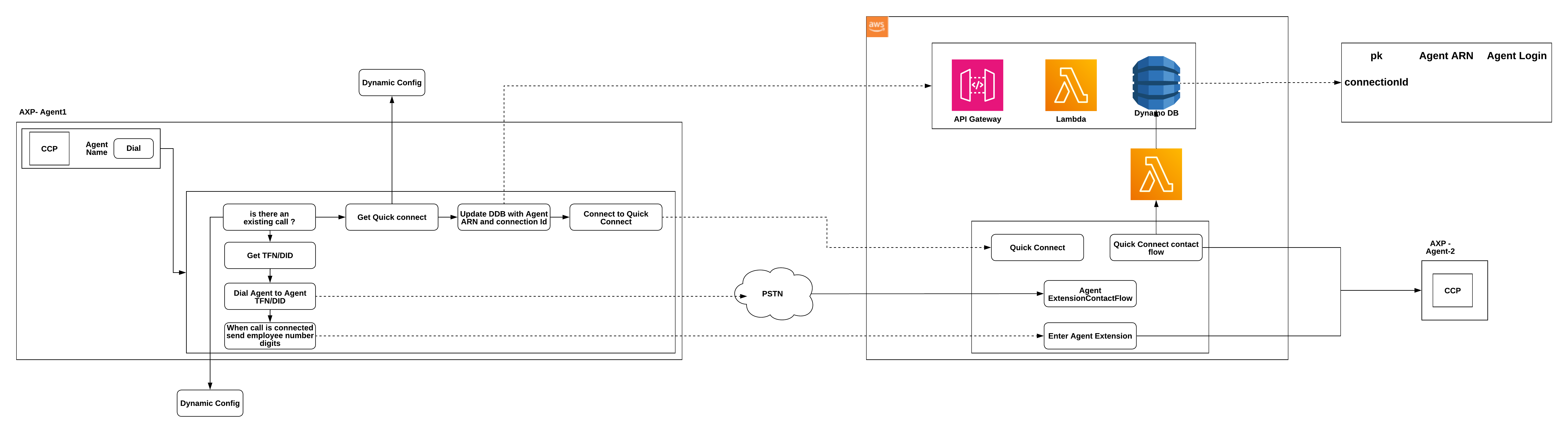
This solution leverages AWS-native services — Amazon Connect, Lambda, DynamoDB, API Gateway, and AppSync — along with a React-based 3P app to integrate directly into the agent workspace.
Presence Management: Agent availability data is stored in DynamoDB and accessed through AppSync APIs managed by a Lambda resolver.
Internal Call Routing: A dedicated Amazon Connect Contact Flow handles internal transfers between agents using “Transfer to Phone Number” or “Transfer to Agent” blocks.
Call Initiation via API Gateway: A secure REST API (backed by Lambda) allows the React app to initiate an internal call by invoking the contact flow with the target agent’s ID.
Workspace Integration: A React widget embedded into the Amazon Connect Agent Workspace provides an intuitive UI for searching agents and initiating calls, with optional presence indicators.
Figure 1. Architecture Diagram
Steps to be detailed
Step 1: Create an Agent Presence DynamoDB table
In the AWS Management Console, navigate to DynamoDB → Tables → Create Table.
Set the Table name to AgentPresenceTable.
Set the Partition key to PK (String) and the Sort key to Login (String).
Go to Amazon Connect → Agent applications → Third-party apps → Add new app.
App name: Agent Caller.
URL: Paste the hosted React app URL (from S3 or CloudFront).
Add permissions for API access and DynamoDB read/write as needed.
Save and verify that the app loads inside the Agent Workspace.
Cleaning up
Once you’ve tested and validated the Agent to Agent Calling integration, it’s important to clean up unused AWS resources to prevent ongoing charges. Below are the components you may want to delete:
DynamoDB table
Navigate to the DynamoDB console
Locate the table created to store events
Select it and choose Delete table
Agent Status Lambda function
Go to the Lambda console.
Find and delete the Lambda function.
call initiation Lambda function
Locate and remove the Lambda function that served call initiation.
API Gateway
In the API Gateway console, identify the API created to expose agent to agent calling.
Delete the API to prevent any further external calls and usage charges.
Custom Amazon Connect contact flows
React JS 3P widget in the agent workspace
Navigate to the Amazon Connect console.
Under Agent Application Settings, remove the 3P app (React widget) from the workspace configuration.
IAM roles & permissions
Review any IAM roles created for the Lambda functions, API Gateway, or DynamoDB.
Detach unnecessary policies or delete unused roles to maintain a clean IAM setup.
Conclusion:
Agent-to-agent calling in Amazon Connect bridges communication gaps and enhances agent collaboration without needing external tools or additional infrastructure.
This version focuses on search and transfer capabilities, providing a simple and secure way for agents to connect internally. Using AWS-native services ensures flexibility, scalability, and a strong foundation for future enhancements such as presence awareness, internal call analytics, and real-time reporting.
About the authors
Agnel Joseph is a Senior AWS Professional Services consultant in Amazon Connect and cloud-native contact center modernization. Agnel helps enterprises design and deploy scalable, resilient, and intelligent agent experience platforms. He is a technologist and student who loves learning and creating new Solutions.
Thiru Subramanian is an AWS Professional Services consultant specializing in Amazon Connect, bringing 20+ years of expertise in the contact center space. He excels at transforming traditional enterprise call centers into Amazon Connect solutions, with a focus on creating customer-centric implementations and seamless integrations. Outside of professional pursuits, Thiru enjoys traveling and reading books.
Rama Krishna Yalla is an Associate Delivery Consultant at AWS, adept at designing scalable, reliable, and secure cloud environments. He leverages automation and CI/CD best practices to streamline software delivery, reduce downtime, and enhance operational efficiency. He specializes in Amazon Connect, where he helps customers implement and optimize cloud-based contact center solutions tailored to business needs. Outside of work, Rama enjoys playing badminton and often participates in local tournaments.
Satish Somasundaram is a Senior Amazon Connect Consultant at AWS. He provides thought leadership and guidance to customers on their Customer Experience transformation journey to Amazon Connect.
Swetha Tharvesanchi Mallikarjunais a Delivery Consultant at AWS Professional Services, specializing in application development and AI solutions. She helps enterprises build modern, scalable, user-focused applications using AWS services to deliver exceptional user experiences. With expertise in creating comprehensive solutions that drive business value. Outside of work, she enjoys spending quality time with her family.











More Stories
Integrating AI and Automation for Seamless Digital Workplace Communication and Collaboration
What motivates the formation and evolution of emergency collaboration networks for extreme weather events: a research based on exponential random graph model
Leiden University outlines approach to responsible collaboration following advice of Committee on Human Rights